Your pod works fine for hours. Then a request takes five seconds instead of one millisecond. No errors logged. No obvious cause. You restart nothing, change nothing, and it recovers — until it happens again.
If this pattern is familiar and you're on Kubernetes, the cause is likely a race condition inside the Linux connection tracking subsystem (conntrack) that fires specifically during DNS lookups. It's not a Kubernetes bug, not a CoreDNS bug, and not a network problem. It's a consequence of how the Linux kernel handles concurrent UDP packets through NAT.
This post walks through exactly what happens, how to confirm it, and how to fix it.
What conntrack is and why Kubernetes uses it
Every Linux host doing any form of NAT — masquerade, DNAT, port forwarding — relies on conntrack (Netfilter connection tracking). It's a kernel subsystem that maintains a stateful table of every active network flow so that reply packets can be matched to the request that spawned them.
Each entry in the conntrack table is keyed by a 5-tuple:
| Field | Example |
|---|---|
| Source IP | 10.0.0.15 (pod IP) |
| Source port | 32145 |
| Destination IP | 10.96.0.10 (CoreDNS ClusterIP) |
| Destination port | 53 |
| Protocol | UDP |
For this table to work correctly, every entry must have a unique 5-tuple. Two simultaneous connections with the same 5-tuple would produce an ambiguous state — conntrack doesn't know which reply goes where.
In a Kubernetes cluster, every pod-to-service packet goes through iptables MASQUERADE on the node (or through kube-proxy iptables rules). This rewrites the source IP from the pod's IP to the node's IP, then relies on conntrack to track the reverse mapping so replies come back to the right pod. No conntrack — no NAT — no Kubernetes networking.
The DNS query path in a Kubernetes pod
Before the race, understand the path a pod takes to resolve a hostname.
When your Go, Python, or Java application calls getaddrinfo("my-service"), the glibc resolver reads /etc/resolv.conf. In a Kubernetes pod, that file is injected by kubelet and looks like:
nameserver 10.96.0.10
search default.svc.cluster.local svc.cluster.local cluster.local
options ndots:5
The ndots:5 option means: if the name being looked up has fewer than 5 dots, treat it as a relative name and search through every suffix in the search list before trying it as an absolute name.
For a lookup of my-service.default, that generates this sequence of DNS queries — in order:
my-service.default.default.svc.cluster.local → NXDOMAIN
my-service.default.svc.cluster.local         → NXDOMAIN
my-service.default.cluster.local             → NXDOMAIN
my-service.default                           → ANSWER  (if it's a valid FQDN)
That's already four round trips for a single lookup on a simple name. Now add the A vs AAAA issue.
The actual race condition
Modern libc resolvers, by default, issue both A (IPv4) and AAAA (IPv6) queries simultaneously for each DNS lookup — a parallel dual-stack query strategy designed to reduce latency. Both queries go to the same nameserver, on the same socket, from the same source port, at nearly the same time.
Here's the problem:
A    query: src=pod-ip:32145 → dst=10.96.0.10:53 UDP
AAAA query: src=pod-ip:32145 → dst=10.96.0.10:53 UDP
                  ↑ identical 5-tuple
Both packets exit the pod and hit the node's iptables masquerade rule. The SNAT rule must create a conntrack entry for each. On a lightly loaded node, the two packets often interleave at microsecond intervals. The kernel processing looks roughly like this:
- Packet 1 (A query) arrives at iptables → conntrack lookup → no entry → create new entry for
node-ip:32145 → 10.96.0.10:53 - Packet 2 (AAAA query) arrives at iptables → conntrack lookup → entry already exists with the same 5-tuple
At this point, conntrack tries to pick an alternate source port for the second packet. Under concurrent load this can fail — both packets raced to conntrack simultaneously before the first entry fully committed, each observed the table as empty, and now there's a conflict. One packet gets silently dropped by the kernel. The drop increments a counter and generates no error to userspace.
CoreDNS receives only one of the two queries. The resolver waits for both replies. After options timeout:5 (the default), the unanswered query times out. The resolver retries on a new port and everything works — 5 seconds later.
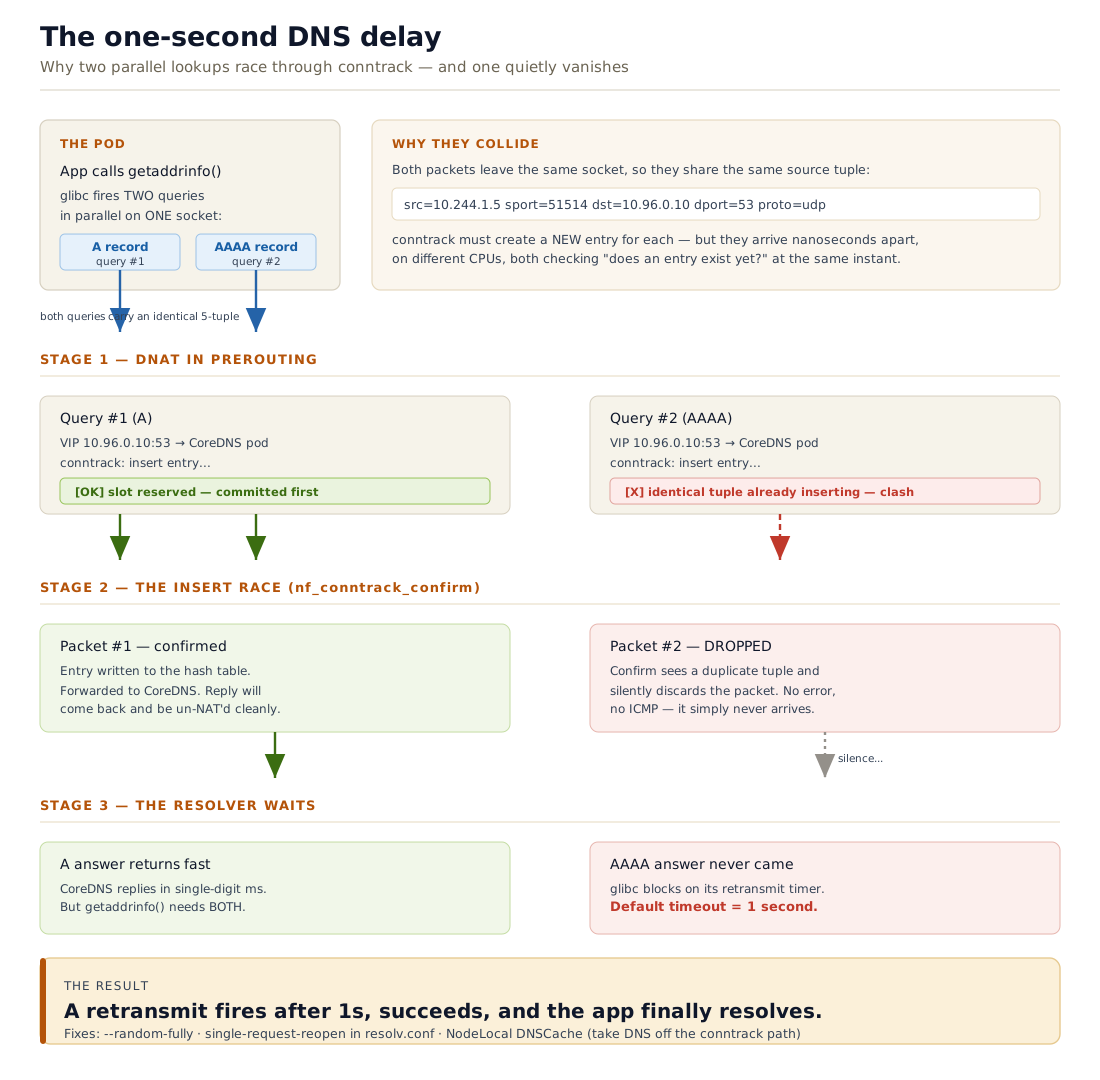
The sequence is non-deterministic. It depends on CPU scheduling, NIC interrupt timing, and how full the conntrack table is. Under low load it almost never fires. Under concurrent pod-level DNS activity — like a deployment rollout where 50 pods all start simultaneously and each one resolves service names — it becomes frequent.
Confirming it is actually conntrack
Step 1: Watch insert_failed
This is the most direct signal. conntrack -S shows per-CPU counters for the conntrack subsystem:
conntrack -S
Output on a node experiencing the race:
cpu=0     found=14821 invalid=0 insert=14821 insert_failed=847 ...
cpu=1     found=13201 invalid=0 insert=13201 insert_failed=632 ...
insert_failed is the exact counter that increments when a conntrack entry creation fails due to a collision. A non-zero value while DNS failures are happening is strong evidence. Watch it live:
watch -n 1 'conntrack -S | awk "{sum += \$6} END {print \"insert_failed:\", sum}"'
If the count climbs during the spike window and resets between incidents, you have the race.
Step 2: Packet-level confirmation
On the node, run a capture filtered to DNS traffic from a specific pod:
# Get the pod's IP
POD_IP=$(kubectl get pod <pod-name> -o jsonpath='{.status.podIP}')

# Capture on the veth interface
tcpdump -i any -n "src $POD_IP and udp port 53" -w /tmp/dns.pcap
Open in Wireshark and look for two outgoing DNS queries with the same source port and no corresponding response to one of them. The missing response is the dropped packet.
Step 3: strace the resolver (last resort)
If you need to confirm the timeline at the process level:
kubectl exec <pod> -- strace -e trace=network -f -p 1 2>&1 | grep -i dns
You'll see two sendmsg calls in rapid succession for A and AAAA, and then only one recvmsg within milliseconds, followed by a 5-second poll timeout.
Step 4: Check CoreDNS metrics
CoreDNS exports Prometheus metrics. If you have Prometheus installed:
rate(coredns_dns_requests_total{type="AAAA"}[5m])
versus
rate(coredns_dns_responses_total{type="AAAA"}[5m])
A persistent gap between requests CoreDNS sent responses to and requests your pods received responses for points to packet loss between the pod and CoreDNS — consistent with the race.
Remediation
There are four levers. They address different root causes and are not mutually exclusive.
Option 1: single-request-reopen (quick pod-level fix)
This resolv.conf option tells the resolver to send A and AAAA queries sequentially on different sockets instead of simultaneously on the same socket. Sending from different sockets guarantees different source ports, which means different 5-tuples, which means no collision.
spec:
  dnsConfig:
    options:
      - name: single-request-reopen
Apply this to any Deployment/DaemonSet/StatefulSet where you see the issue. It adds a small latency overhead (~0-5ms per lookup in practice) because queries serialize, but that's negligible compared to a 5-second timeout.
The sibling option single-request does the same thing but reuses the same socket (which means the same source port). On Linux kernels older than ~4.17, even this could race because the socket is half-duplex between the two queries. single-request-reopen is safer.
spec:
  dnsConfig:
    options:
      - name: single-request-reopen
      - name: ndots
        value: "2"
Option 2: NodeLocal DNSCache (proper fix for EKS)
NodeLocal DNSCache runs a DNS caching agent as a DaemonSet on every node. Pods are configured to talk to a link-local IP (169.254.20.10 by default) rather than the CoreDNS ClusterIP. That link-local address is bound to a dummy interface on the node and never leaves the node.
This eliminates SNAT entirely. If DNS never goes through NAT, conntrack is never involved, and the race cannot happen. It also reduces DNS latency (cache hits are sub-millisecond) and reduces load on CoreDNS.
On EKS, deploy it via the official manifest:
curl -sSL https://raw.githubusercontent.com/kubernetes/kubernetes/master/cluster/addons/dns/nodelocaldns/nodelocaldns.yaml | \
  sed 's/__PILLAR__LOCAL__DNS__/169.254.20.10/g; s/__PILLAR__DNS__DOMAIN__/cluster.local/g; s/__PILLAR__DNS__SERVER__/10.96.0.10/g' | \
  kubectl apply -f -
Update pods to use the link-local address:
spec:
  dnsConfig:
    nameservers:
      - 169.254.20.10
    searches:
      - default.svc.cluster.local
      - svc.cluster.local
      - cluster.local
    options:
      - name: ndots
        value: "5"
Or, if your cluster version supports it, configure NodeLocal DNSCache to automatically intercept requests from pods without pod-level changes (requires iptables NOTRACK rules — the NodeLocal DNSCache manifest handles this).
Option 3: Reduce ndots
Every extra DNS search path query is a potential race window. The default ndots:5 creates up to 4 failed lookups before the correct answer. Reducing ndots lowers exposure:
spec:
  dnsConfig:
    options:
      - name: ndots
        value: "2"
With ndots:2, a name like my-service.default is tried as-is first (it has one dot, fewer than 2), falling through to the search path only if the direct query fails — which is the opposite of the default. For service names that are already in short form (my-service), you'll still hit the search path. The cleanest approach is to always use FQDNs in your code:
my-service.default.svc.cluster.local.
The trailing dot marks it as absolute — no search path, single query pair.
Option 4: conntrack table size tuning
This doesn't fix the race condition directly but prevents a related failure mode: conntrack table exhaustion. When the table is full, all new connections fail with nf_conntrack: table full, dropping packet.
Check the current limit and usage:
# Limit
sysctl net.netfilter.nf_conntrack_max

# Current usage
cat /proc/sys/net/netfilter/nf_conntrack_count
On EC2 nodes, the default is often 131072. For nodes with many pods and high connection rates, this can fill. Tune via a DaemonSet that applies sysctl settings, or in EKS via a node bootstrap script:
sysctl -w net.netfilter.nf_conntrack_max=524288
sysctl -w net.netfilter.nf_conntrack_buckets=131072
The bucket count should be nf_conntrack_max / 4 to maintain efficient hash table performance.
EKS-specific context
On Amazon EKS, a few additional things affect this picture.
CoreDNS autoscaling. EKS ships CoreDNS as a managed add-on with 2 replicas by default. Under heavy pod churn, those two replicas can become a bottleneck independently of the conntrack issue. Use the cluster-proportional-autoscaler to scale CoreDNS with node count.
Node group sysctl configuration. EKS managed node groups don't expose conntrack tuning directly, but you can apply sysctls via a DaemonSet with hostPID: true and privileged: true containers, or via EC2 launch templates with a custom user-data script.
VPC DNS. Every EC2 instance can use the VPC resolver at 169.254.169.253 as a fallback. Kubernetes in-cluster DNS (CoreDNS) takes priority for .cluster.local queries. External names go upstream through CoreDNS to Route 53 Resolver. If your pods query external domains heavily, the same race applies to those queries too — NodeLocal DNSCache is the fix there as well.
Bottlerocket nodes. Bottlerocket's kernel is tuned for container workloads and ships with larger conntrack defaults, but the race condition still applies since it's fundamentally about timing, not table size.
Decision table
| Situation | Recommended fix |
|---|---|
| One-off pod experiencing the race | single-request-reopen in pod dnsConfig |
| Cluster-wide DNS instability | NodeLocal DNSCache DaemonSet |
| High-churn namespaces (batch jobs, rollouts) | NodeLocal DNSCache + CoreDNS autoscaling |
| External DNS queries also affected | NodeLocal DNSCache (eliminates SNAT for all UDP/53) |
conntrack -S shows insert_failed climbing | Start with single-request-reopen; plan for NodeLocal DNSCache |
conntrack table full errors in dmesg | nf_conntrack_max tuning (separate problem from race) |
Quick diagnostics checklist
# 1. Confirm insert_failed is non-zero during the incident
conntrack -S | grep insert_failed

# 2. Check conntrack table utilization
cat /proc/sys/net/netfilter/nf_conntrack_count
sysctl net.netfilter.nf_conntrack_max

# 3. Look for DNS drops in dmesg
dmesg | grep -i conntrack

# 4. Inspect resolv.conf inside the affected pod
kubectl exec <pod> -- cat /etc/resolv.conf

# 5. Check CoreDNS error rate
kubectl logs -n kube-system -l k8s-app=kube-dns --tail=100 | grep -i error

# 6. Verify NodeLocal DNSCache pods (if deployed)
kubectl get pods -n kube-system -l k8s-app=node-local-dns
What's actually happening in one sentence
Two DNS queries sent from the same source port at the same instant race to create conntrack entries; one loses, the kernel drops that packet silently, and the resolver waits five seconds before retrying.
The fix — at the right layer — is to either serialize the queries (single-request-reopen) or remove SNAT from the DNS path entirely (NodeLocal DNSCache). Everything else is mitigation.
Found this useful? See also: What Actually Happens When Internet Traffic Reaches Your EKS Pod and How IRSA Really Works on EKS.