What Actually Happens When Internet Traffic Reaches Your EKS Pod
You deploy an app. You create an Ingress. A minute later, a public URL works and traffic flows to your pods. Magic.
Except it isn't. Between that Ingress YAML and a packet landing on your container, an entire chain of Kubernetes objects and AWS resources quietly assembles itself — and every link in that chain exists to solve a problem created by the link before it.
If you've ever stared at a target group full of unhealthy targets, or an Ingress that provisioned no load balancer at all, or dropped connections during a rolling update, this article is the mental model that makes those failures traceable instead of random.
Here's the one idea everything hangs on:
Every piece in this system exists to maintain a single invariant: the AWS load balancer's target list always mirrors the set of pods that can actually serve traffic right now.
Let's walk the whole chain.
1. Your pods are private by default
A freshly created pod has a cluster-internal IP. A Service in front of it — by default — is also internal. Nothing reaches it from the internet until you explicitly ask for exposure, and how you ask determines what you get.
The Service type is the first decision:
| Service type | Reachable from | Notes |
|---|---|---|
ClusterIP (default) | Inside the cluster only | This is the "private by default" case |
NodePort | Node IP : high port (30000–32767) | Externally reachable if the node SG/NACL allows it |
LoadBalancer | A provisioned cloud load balancer → public | This is where AWS enters the picture |
So "expose my app to the internet" really means "I need a LoadBalancer Service or an Ingress." Which of those you reach for depends on the next question.
Solves in production: "My pod is running and the Service exists, but I can't hit it from outside." — Nine times out of ten it's a
ClusterIPService. There's no external entry point because none was ever requested.
2. L4 or L7? — the routing layer decides your AWS resource
Kubernetes gives you two doors to the outside world, and they sit at different layers of the network stack.
| L4 (transport layer) | L7 (application layer) | |
|---|---|---|
| Operates on | TCP / UDP, IP:port | HTTP / HTTPS — paths, hosts, headers |
| Sees | Packets and ports | The full request: URL, method, cookies |
| Kubernetes object | Service of type LoadBalancer | Ingress |
| AWS resource | NLB (Network Load Balancer) | ALB (Application Load Balancer) |
| Routing logic | "Send port 443 traffic to these targets" | "/api → service-a, host: shop.example.com → service-b" |
| TLS | Pass-through, or terminate at the NLB | Terminates at the ALB; supports SNI and redirects |
The rule of thumb: if you're doing host- or path-based HTTP routing, you want an Ingress → ALB. If you need raw TCP/UDP throughput or non-HTTP protocols, you want a LoadBalancer Service → NLB.
A common misconception worth killing here: an Ingress does both host-based and path-based routing, not just paths. host: api.example.com and path: /v2 are both first-class matching rules.
3. The AWS Load Balancer Controller — the translation layer
Here's the part people skip and then get confused by: creating an Ingress object does nothing on its own. There is no built-in EKS component that turns an Ingress into an actual ALB. The object just sits in etcd, unfulfilled.
The thing that fulfills it is the AWS Load Balancer Controller (LBC) — a controller you install into the cluster (typically in kube-system). Its entire job is to watch Kubernetes objects and provision the corresponding real AWS resources.
| You create | The LBC watches | The LBC provisions |
|---|---|---|
Ingress | Ingress resources | An ALB (L7) |
Service type LoadBalancer (with NLB config) | Service resources | An NLB (L4) |
This is the bridge between Kubernetes intent and AWS networking reality. Remove the controller, and your Ingress objects become inert.
Solves in production: "I applied my Ingress and no load balancer was created." — Check that the LBC is actually running and healthy (
kubectl get deploy -n kube-system aws-load-balancer-controller), that its IAM permissions (IRSA) are correct, and that theingressClassNamematches what the controller manages. No controller, no ALB.
4. How does traffic reach pods? — target-type: ip vs instance
Once the ALB exists, it needs targets to send traffic to. There are two registration modes, and on EKS the difference is significant.
target-type | LB registers | Traffic path |
|---|---|---|
instance | Node + NodePort | LB → node → kube-proxy → pod (extra hop) |
ip | The pod IP directly | LB → pod (no kube-proxy hop) |
On EKS, target-type: ip is the common choice because the VPC CNI gives every pod a routable VPC IP address. That means the ALB or NLB can send a packet straight to the pod, skipping the node-port hop entirely. Lower latency, cleaner health checks, and the load balancer's view of "a target" maps 1:1 to "a pod."
This is also the answer to a question that trips people up: "Does the load balancer route to Services or to pods?" You declare a Service in your Ingress, but with target-type: ip the LB ends up talking to pod IPs directly. The Service is the abstraction; the pods are the destination.
5. TargetGroupBinding — the controller's sync engine
This is where the LBC's design gets elegant. It splits its job into two halves:
| Phase | What happens | Managed by |
|---|---|---|
| 1. Infrastructure | ALB/NLB, listeners, rules, and target groups are created in AWS | The LBC's ingress/service reconciler |
| 2. Target registration | Pods are registered and deregistered into target groups | The TargetGroupBinding controller |
TargetGroupBinding (TGB) is a Custom Resource the LBC installs. When you create an Ingress, the LBC builds the ALB and a target group, then auto-creates one TGB to manage that target group.
The TGB's only job is keeping the target group's pod list accurate:
| Event | TGB action |
|---|---|
| A new pod becomes ready | Register it in the target group |
| A pod dies or goes unready | Deregister it |
It knows the current set of pods by watching the backing Service's EndpointSlices (more on those next). That continuous register/deregister reconciliation loop is the entire point of the TGB.
The standalone use case (Bring Your Own load balancer)
You can also create a TGB yourself. If your platform team provisions the ALB and target group through Terraform or CloudFormation — because load balancer lifecycle must live in IaC, not in the cluster — you skip the Ingress and write a TGB pointing at the existing targetGroupARN. The LBC then manages target registration only and never touches the load balancer itself.
apiVersion: elbv2.k8s.aws/v1beta1
kind: TargetGroupBinding
metadata:
  name: my-app-tgb
spec:
  serviceRef:
    name: my-app-service
    port: 80
  targetGroupARN: arn:aws:elasticloadbalancing:...:targetgroup/my-app/abc123
  targetType: ip
Solves in production: "My target group is full of
unhealthytargets." — First check whether the health check path/port the target group probes actually matches a working endpoint on the pod. Withtarget-type: ip, also confirm the pod security group allows the health-check traffic from the load balancer. The TGB will faithfully register pods that then fail their health checks — registration success is not the same as health success.
6. IngressGroup — many Ingresses, one ALB
Default behavior: one Ingress = one ALB. Each ALB carries an hourly charge plus LCU costs, and each one consumes ENIs and subnet IPs. Twenty small apps become twenty ALBs — real money and real IP exhaustion.
IngressGroup fixes this by letting multiple Ingress resources share a single ALB.
| Annotation | Effect |
|---|---|
alb.ingress.kubernetes.io/group.name: my-team | All Ingresses with this name merge onto one shared ALB |
alb.ingress.kubernetes.io/group.order: '10' | Rule priority on the shared ALB — lower numbers evaluate first |
Three Ingresses across three namespaces sharing group.name: platform produce a single ALB whose listener rules are the merged set of all their host/path rules, ordered by group.order.
The contrast:
| Implicit group (no annotation) | Explicit group | |
|---|---|---|
| ALB count | One per Ingress | One per group name |
| Keyed by | namespace/name | group.name |
| Cross-namespace sharing | No | Yes |
This is a big cost and scaling win, but it comes with a security caveat worth flagging:
| Risk | Why it happens |
|---|---|
| Group hijacking | Anyone who can create an Ingress with an existing group.name — even in another namespace — can inject rules onto the shared ALB |
| Ordering collisions | Two Ingresses with the same group.order and overlapping paths produce undefined precedence |
Treat group names as semi-privileged: govern them with a naming convention or an admission policy rather than leaving them a free-for-all.
7. EndpointSlices — how the truth gets tracked
Back in step 5, the TGB needed to know "which pods are alive behind this Service right now?" The answer lives in EndpointSlices.
An EndpointSlice is a Kubernetes object that lists the actual network endpoints — pod IP, port, and readiness state — currently backing a Service. It exists because of a scaling problem with the object that came before it.
Old Endpoints object | EndpointSlices | |
|---|---|---|
| Structure | One giant object per Service listing every endpoint | Endpoints split across many small slices (≤100 each by default) |
| On a pod change | Rewrite the whole object, push it to every kube-proxy | Rewrite only the one affected slice |
| At 5,000 pods | Massive etcd and network churn on every change | Tiny, localized update |
The old single-object design melted at scale; slices made endpoint tracking cheap.
What each slice carries:
| Field | Meaning |
|---|---|
addresses | Pod IPs |
ports | Target ports |
conditions | ready / serving / terminating — readiness state |
topology / nodeName | Which node/zone the endpoint is on (enables topology-aware routing) |
Slices are created automatically by the EndpointSlice controller in the kube-controller-manager and labeled kubernetes.io/service-name: <svc> to link back to their Service. You never author them by hand.
8. ready vs serving — the conditions that make draining graceful
This is the subtle one, and it's exactly the kind of detail that turns a confusing rolling-update incident into an obvious one.
The short version: ready accounts for whether the pod is terminating; serving does not.
| Condition | True when |
|---|---|
ready | Readiness probe is passing and the pod is not terminating |
serving | Readiness probe is passing — terminating state is ignored |
terminating | The pod has a deletion timestamp (it's shutting down) |
They're identical except during termination. Watch a single pod move through its lifecycle:
| Pod state | ready | serving | terminating |
|---|---|---|---|
| Running, probe passing | true | true | false |
| Running, probe failing | false | false | false |
| Terminating, still passing probe | false | true | true |
| Terminating, probe failing | false | false | true |
That bold row is the entire reason serving exists.
Why it was added
Originally there was only ready. A terminating pod was instantly marked ready: false and yanked from rotation — even though it could still happily finish in-flight requests during its grace period. The result was dropped connections on every rolling update. The serving condition was introduced to decouple "can this pod still handle traffic?" from "is this pod going away?"
Why it matters for the load balancer
Two consumers read these conditions differently:
| Consumer | Reads | Behavior |
|---|---|---|
kube-proxy (classic Service routing) | ready | Stops sending to a pod the moment it's terminating |
| Smart load balancers / drain logic | serving + terminating | Keeps routing to a serving: true, terminating: true pod while it drains |
This is what lets the AWS target group drain gracefully: it sees "this pod is going away (terminating) but can still serve (serving)", stops sending it new traffic, and lets existing connections finish — instead of hard-cutting them.
Solves in production: "We see dropped requests / 502s during every rolling update." — Look at your
terminationGracePeriodSeconds, yourpreStophook, and the target group deregistration delay. The graceful path depends on the pod stayingservinglong enough for in-flight requests to complete and for the load balancer to finish deregistering it before the container actually dies.
CKA-flavored gotcha:
ready: falsedoes not automatically mean "broken." During a rolling update it usually just means "terminating but still serving." The pod isn't unhealthy — it's politely on its way out.
Connecting the dots
Every piece we walked through solves a problem created by the one before it. Here's the full chain in one breath:
I want internet traffic to reach my pods → so I declare intent in Kubernetes (Ingress or LoadBalancer Service) → the LBC translates that into real AWS infrastructure (ALB or NLB) → and it keeps that infrastructure pointed at only the live, healthy pods as they churn.
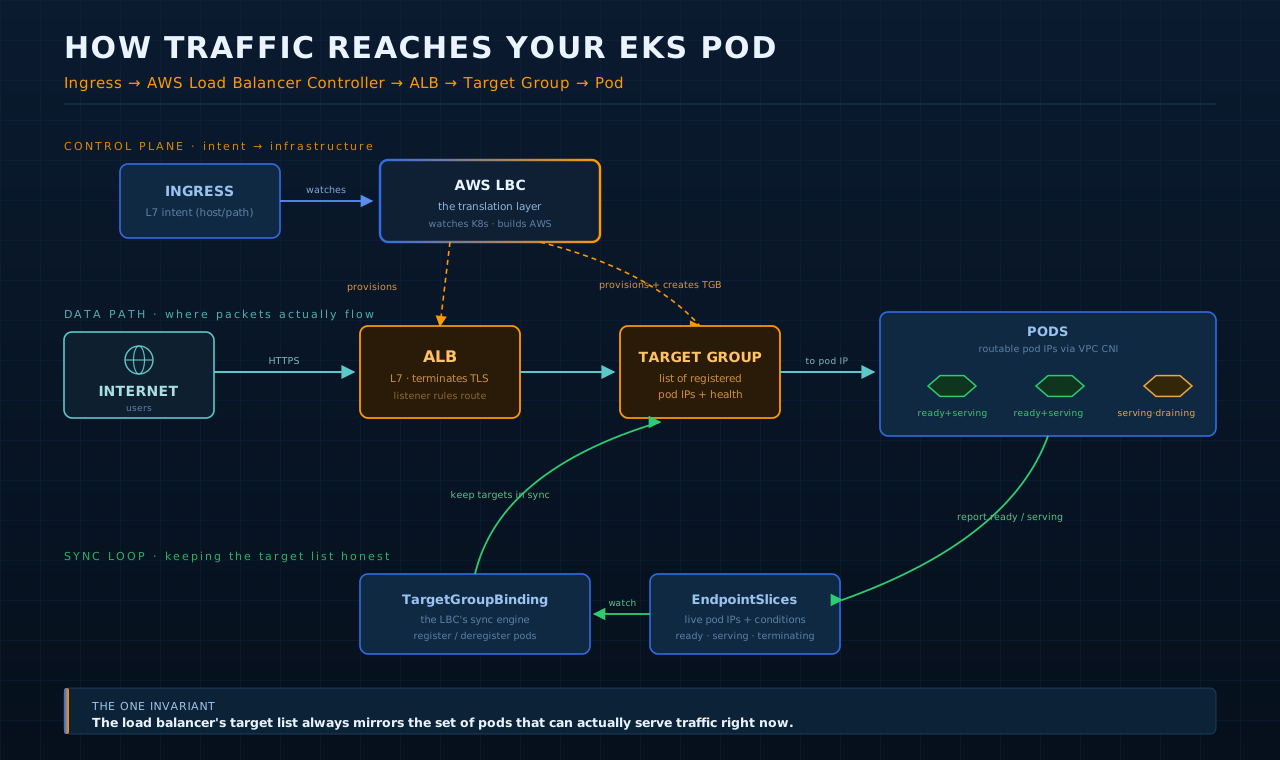
And the layered view that ties the objects together:
| Layer | You declare | Translated by | Into | Kept in sync by | Reads |
|---|---|---|---|---|---|
| Intent | Ingress / Service:LB | AWS LBC | ALB (L7) / NLB (L4) | — | — |
| Targets | (implicit) | LBC | Target group | TargetGroupBinding | EndpointSlices |
| Health | readiness probe | kubelet | pod conditions | EndpointSlice controller | ready / serving |
The one connecting idea, one more time: the load balancer's target list always mirrors the set of pods that can actually serve traffic right now. Ingress and Service declare the intent. The LBC builds the plumbing. The TargetGroupBinding and EndpointSlices keep the truth current. And the serving condition makes the handoff graceful.
Once you hold that invariant in your head, every failure in the path has an obvious place to look — and Kubernetes stops feeling like magic and starts feeling like a system you can debug.
Found this useful? It pairs well with the kubectl apply deep dive — same "open the black box" approach, one layer up the stack.